> For the complete documentation index, see [llms.txt](https://docs.gtokentool.com/llms.txt). Markdown versions of documentation pages are available by appending `.md` to page URLs; this page is available as [Markdown](https://docs.gtokentool.com/qu-kuai-lian/ti-bi-bai-ming-dan-shen-me-yi-si-ru-he-shi-yong-ti-bi-bai-ming-dan.md).
# 提币白名单什么意思?如何使用提币白名单?
在加密货币市场中,白名单是一个至关重要的概念。当前为了保护投资者的账户免受未经授权的提款和黑客攻击,很多交易平台都推出并实施提现白名单这一措施。提现白名单是一种安全措施,这种机制通过限制资金只能提到预先批准的地址来确保账户的安全性。尤其是需要处理大量地址时,批量添加白名单的功能显得尤为重要。简单介绍了提币白名单什么意思?可能还有人不理解。下面GTokenTool为大家通俗讲解提币白名单。
## 提币白名单什么意思?
提币白名单是一个由用户指定的加密货币地址列表。只有列入该白名单的地址可以从用户的账户中提取资金。换句话说,即使黑客获得了用户的账户登录信息,也无法将资金提取到未经授权的地址。下文是具体的提币白名单优势分析:
### 1、提高账户安全性:
即使账户被盗,黑客也无法将资金提取到未授权的地址,保护了用户的资产安全。通过限制资金只能转移到白名单中的地址,可以有效防止意外或错误的提币操作。
### 2、增加保护层:
通常在修改白名单时会设置一个冷静期,这意味着在修改后的一段时间内无法立即提现,这样即使黑客试图篡改白名单,用户也有时间发现并阻止。
### 3、用户控制:
用户可以随时更新或修改白名单地址,灵活地管理资金提取的安全性。
## 如何使用提币白名单?
使用提币白名单相对来说还是比较简单的,目前多家交易所内都能够使用,下文就是在欧易交易所使用提币白名单的具体教程:
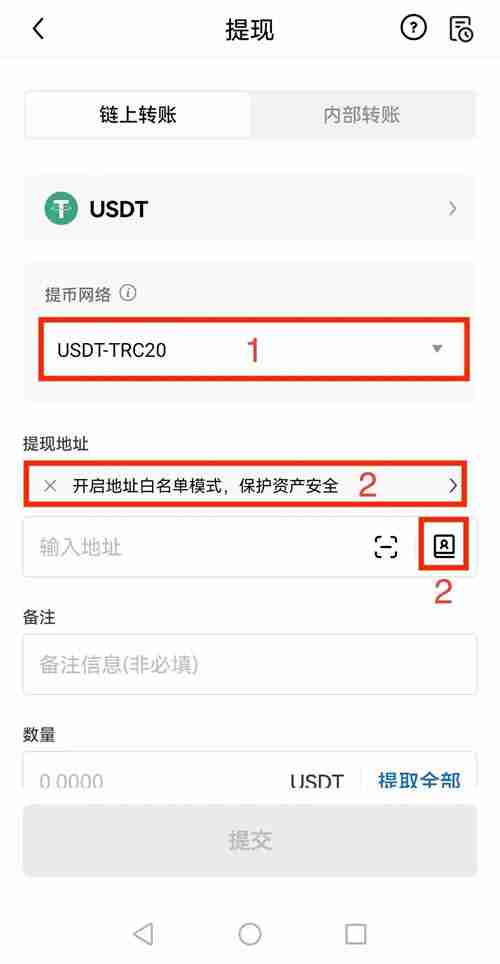
1、打开欧易App(官方注册 官方下载),点击【资产】—【提现】;选择【币种】,此处以USDT为例
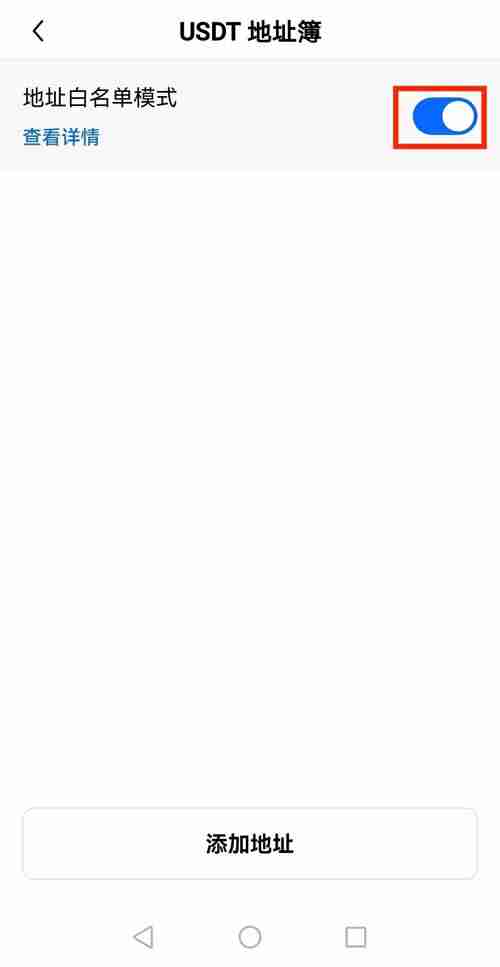
2、选择【链上转账】、【提币网络】,点击【提现地址】后面地址簿图标或者“开启白名单”提示;在新页面,点击开启【地址白名单模式】按钮—并点击相应地址选用;
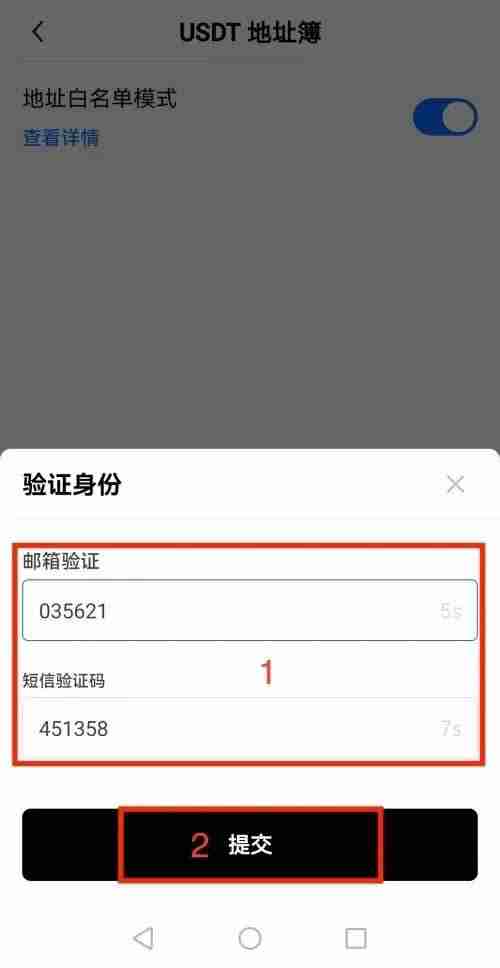
3、在地址簿页面您可以关闭提币白名单,请按照页面提示完成验证。
4、在提币白名单模式下,选用地址后,按提示输入【数量】—【提交】,完成提币操作。
注:
提币白名单模式下,用户不可提币到手动输入的新地址,只能提币到地址簿内的地址。关闭白名单模式后,“手动输入新地址”功能即可恢复。 提币白名单与免认证地址的关系: 两者独立设定,互不影响。
如有不明白或者不清楚的地方,请加入官方电报群:[**https://t.me/gtokentool**](https://t.me/gtokentool)