> For the complete documentation index, see [llms.txt](https://docs.gtokentool.com/llms.txt). Markdown versions of documentation pages are available by appending `.md` to page URLs; this page is available as [Markdown](https://docs.gtokentool.com/en/auxiliary-information/ave-check.md).
# Ave Detection: Full Green Guide
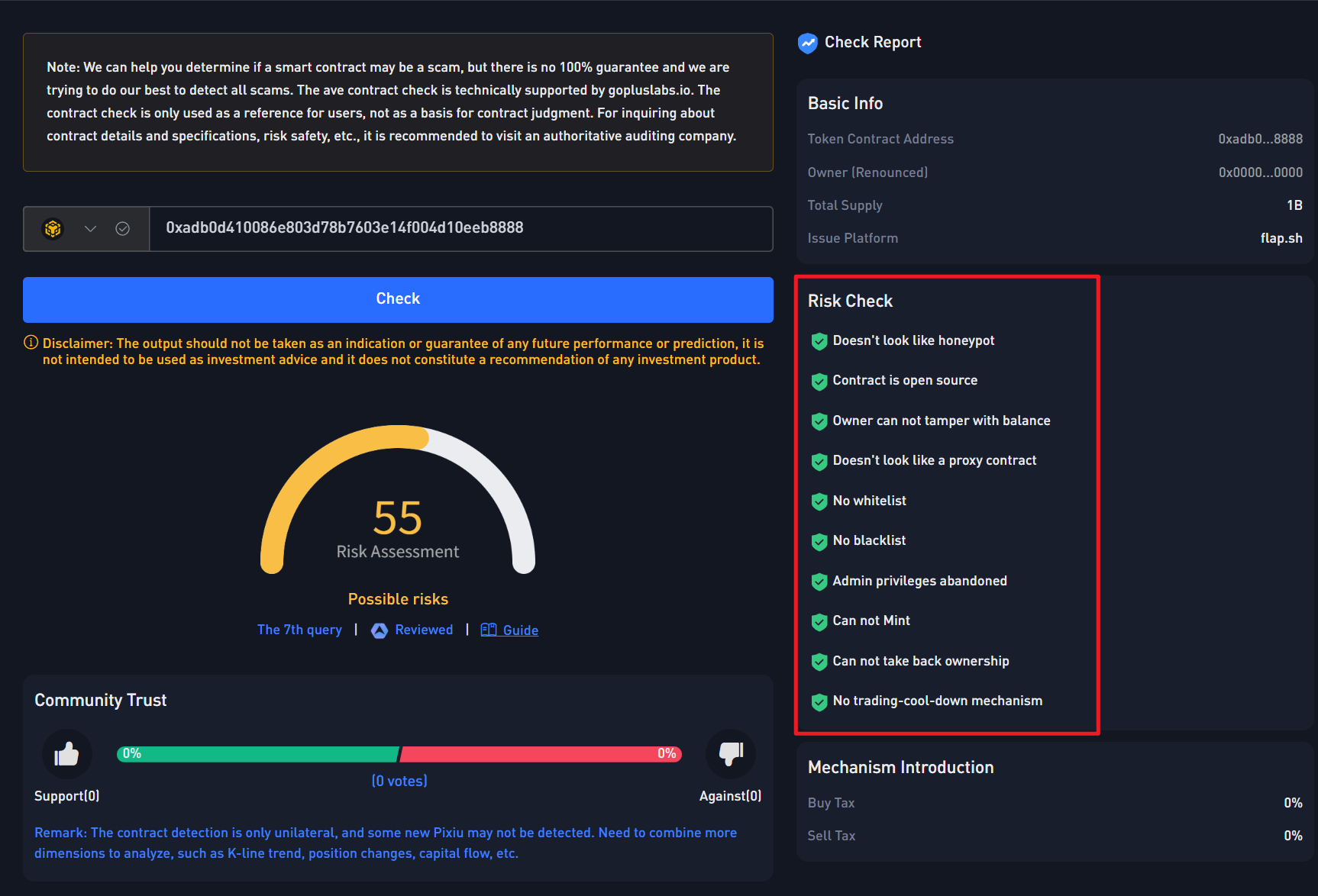
Ave detection all green means that on the Ave security detection page, there are no risks at all, and all prompts are marked green, as shown in the following figure:
## How to Get Full Green in Ave Detection?
### 1. Standard Contract: Auto Full Green
Creating a standard contract through GTokenTool can achieve automatic all-green results in Ave detection.
Create Token:
### 2. How to Get Full Green for Dividend Contracts?
When conducting an Ave check on a dividend contract, there may be relevant prompts such as whitelists and blacklists, so there is no need to worry. First, after confirming that the contract tax rate does not need to be modified, discard the contract permissions, then enter the Ave Telegram group to find volunteer customer service for a review, and you can achieve all green.
* Ave Telegram Group:
* Relevant Words: Dear Admin, the contract address (yours) has waived rights. Please review. Thanks.
If the administrator ignores you, it means you need to pay for an audit. In the detection results, Ave will add a "AUDITED" label to the token, and by default, all tokens that have undergone an audit will be fully green. It just requires payment, with a price of around 100U.
### 3. How to fix 100% buy tax display?
If you enable the "Manual Opening" function when creating a contract, the purchase tax rate will be 100% before you open the market, because others cannot make purchases. After manually opening the market, use non-whitelisted addresses (non-permissioned addresses and non-marketing addresses) to make several purchases to prove that anyone can buy. Then, after detecting these transactions, Ave will automatically lower the purchase tax rate.
### 4. Why is the sell tax displayed inaccurately?
In some dividend contracts, the sell tax rate displayed by Ave is higher than the actually set tax rate. The reason for this issue is that when users sell, dividends are distributed, which drives up the tax rate. Based on the actual selling situation, the tax rate displayed by Ave fluctuates and changes frequently. There are two ways to solve this problem:
1. Sell several more times using non-whitelisted addresses, and Ave will automatically lower the selling tax rate.
2. Join the Ave Telegram group to appeal to customer service volunteers. After their review, a fixed tax rate will be displayed, and it will no longer fluctuate.
3. When uploading an avatar on Ave, you can also fill in the tax rate, and once filled in, it will be fixed.
***
### 🤝 Connect with GTokenTool
* 💬 **Telegram Community:** [Click to join our official group](https://t.me/GToken_EN)
* 💻 **Official Website:** [Visit our official site for full features](https://gtokentool.com/)
* 🐦 **Twitter (X):** [Follow us for the latest updates](https://twitter.com/GTokenTool)
* 📺 **Video Tutorials:** [Subscribe to our YouTube Channel](https://www.youtube.com/@GTokenTool)
> ⚠️ **Risk Warning & Disclaimer**
>
> GTokenTool reserves the right to modify this notice without prior notice. All platform information is for reference only. We do not endorse any virtual assets or activities. Virtual assets are highly volatile and carry significant financial risk. Please invest with caution and conduct your own due diligence.